
Forwarding webhooks to localhost without a tunnel
Public tunnels leak URLs, rotate hostnames, and expire mid-debug. Forwarding from a durable bucket keeps the endpoint stable and the payloads replayable.
 Quentin Mousset6 min read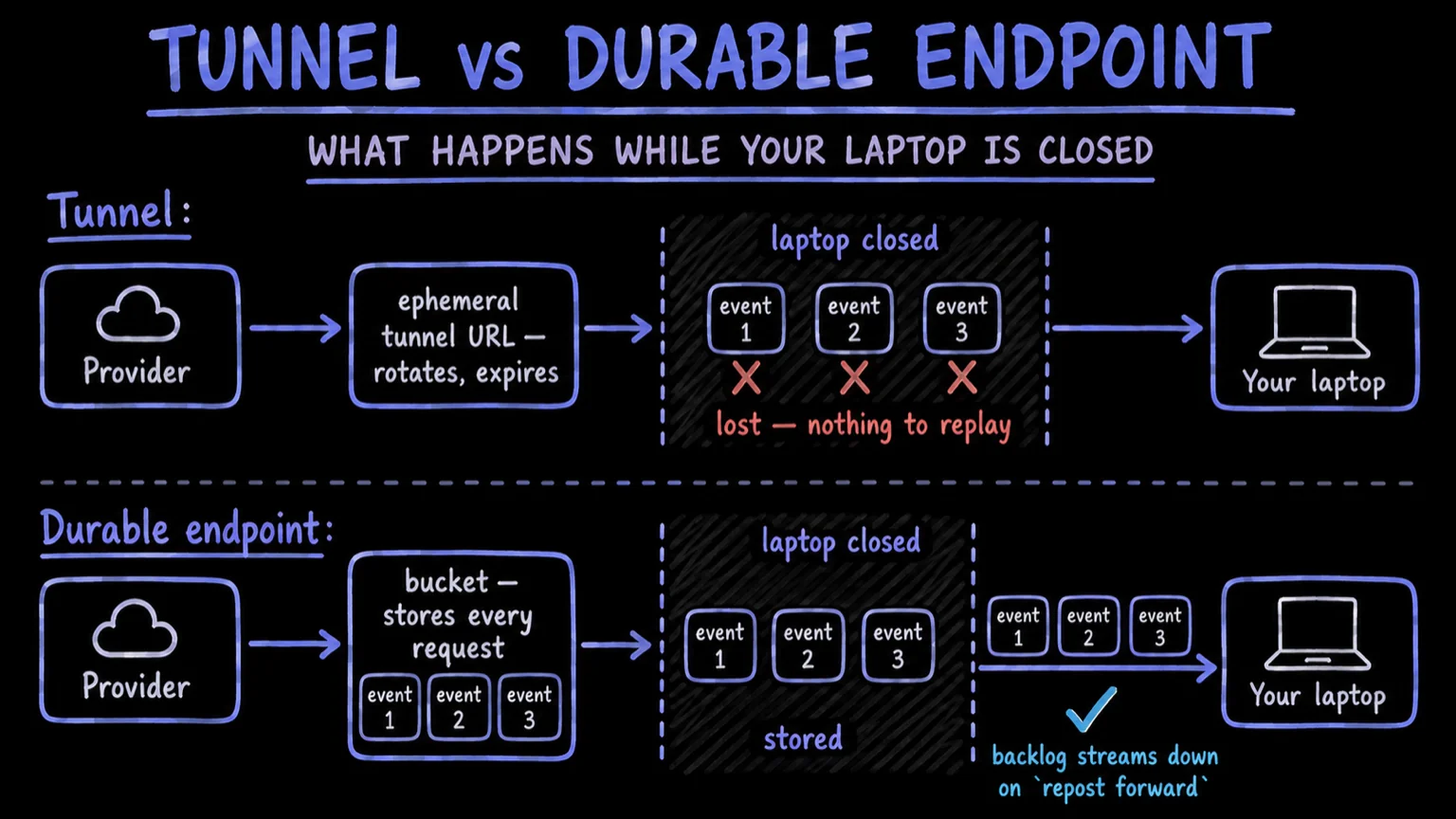
You don't need a tunnel to develop against real webhooks. Point the provider at a durable endpoint once, let that endpoint store every request it receives, and stream the traffic to your local server when you sit down to work. The endpoint stays put; your laptop doesn't have to.
What a tunnel actually costs you#
A public tunnel does one thing: it routes a public URL into a port on your machine while a process is running. Every familiar tunnel failure follows from that coupling.
- The URL is only as durable as the process. Laptop sleeps, network changes, session expires. The endpoint is gone, and the provider is now delivering into nothing.
- Restarts often mean a new hostname. So you're back in the provider's dashboard pasting a URL, with a window of failed deliveries between the old endpoint and the new one.
- Missed payloads are not yours to recover. While the tunnel is down, whether a delivery ever reaches you again depends entirely on the sender's retry policy. You don't control it and you can't inspect it.
- The URL points at your machine. Anyone who has it (and tunnel URLs end up in dashboards, chat threads, and config files) reaches your dev server directly for as long as the tunnel is up.
None of this is a bug in any particular tool. It's what an ephemeral pipe into your laptop means. The fix isn't a better tunnel; it's moving the public endpoint off your machine entirely.
The constraint is as old as the pattern: the man who named webhooks wrote localtunnel himself in 2010, because a callback can only reach code that is already on the internet.
The bucket-and-forward model#
Repost Receive splits the endpoint from the machine. The provider talks to a bucket, a stable URL backed by storage. Your laptop talks to the bucket, never the other way around.
When a request arrives, the bucket stores it - method, headers, query values, body, arrival time - before acknowledging it. Capture is not conditional on your handler being reachable, or finished, or correct.
Forwarding is a separate act. The public URL terminates at the bucket, and
localhost only sees what the CLI streams to it. Start repost forward when you
begin working, kill it when you stop: capture continues either way. That's the
property a tunnel can't give you. The endpoint's uptime and your machine's
uptime stop being the same number.
Everything the bucket captures stays inspectable: you can browse requests in the dashboard or the CLI and search operational fields and payload data across history. The full capture side (inspection, transforms, fan-out) is on the how a bucket is created.
Forward webhooks to localhost in four steps#
- 1Create a bucketRun repost init in your project. It creates an inbound bucket with a stable public URL and links a forwarder to your local port.
- 2Point the provider at itPaste the bucket URL into the webhook settings of the service that sends you events. You do this once: the URL does not change when your machine does.
- 3Start forwardingRun repost forward 3000. Live traffic streams to localhost:3000, along with any retained backlog that arrived while you were not listening.
- 4Iterate with replayFix your handler, then run repost replay to re-fire a captured request at it. You never wait for the provider to send another test event.
The same capture model carries into CI: repost expect blocks until a matching
webhook actually arrives, then your assertions run against a real request - an
assertion, not a sleep(). The complete CLI journey, both directions, is on
the developers page.
Replay yesterday's payloads against today's code#
A tunnel hands you each webhook exactly once, at the moment it arrives. A bucket keeps it.
That changes what a failure is worth. The malformed payload that broke your
handler on Friday night is still in the bucket on Monday. Search history for
it, pull up the exact request, and re-fire it with repost replay until the
fix holds. No staged test event, no asking the provider to please send it
again. Replay doesn't rewrite anything: the original request and its history
stay intact, so you can still tell what happened from what you did about it.
The same evidence-first semantics apply to outbound delivery. See
retry and replay in the history docs.
History stays browsable for 30 days on the Free plan, 3 months on Starter, and 12 months on Pro (compare plans). Replays are never metered: only the original incoming event counts against quota.
Frequently asked questions #
- Can I receive webhooks while my laptop is offline?
- Yes. The bucket stores every request before acknowledging it, whether or not anything is forwarding. The next time you run repost forward, the retained backlog streams down along with live traffic.
- How is a bucket different from a public tunnel?
- A tunnel routes requests into your machine in real time and only exists while its process runs. A bucket is a permanent endpoint that stores first and forwards second: the provider's view of you no longer depends on your machine being up.
- Do replays count against my event quota?
- No. Only the original incoming event is metered. Retries and replays of an event you already received are not billed again.
- How long do captured webhooks stay available?
- History is browsable for 30 days on the Free plan, 3 months on Starter, and 12 months on Pro. Within that window a captured request can be inspected, forwarded, or replayed.
- Can a teammate debug the same traffic?
- Yes. One inbound stream can be forwarded to multiple services or developer machines, so two laptops can watch the same bucket without touching the provider's configuration.